> For the complete documentation index, see [llms.txt](https://help.boomerang3.com/llms.txt). Markdown versions of documentation pages are available by appending `.md` to page URLs; this page is available as [Markdown](https://help.boomerang3.com/boomerang-3-instrukcja-obslugi-uzytkownika/dashboard/misje.md).
# Misje
Pomiary w transporcie.
W standardowych obiektach punkty pomiarowe wysyłają odczyty ciągle.
W transporcie lub krótkich procesach pomiary są zbierane tylko przez określony czas.
Taki zestaw danych w Boomerang 3 nazywamy **misją**.
### Sprzęt i pojęcia
W misjach wykorzystywane są:
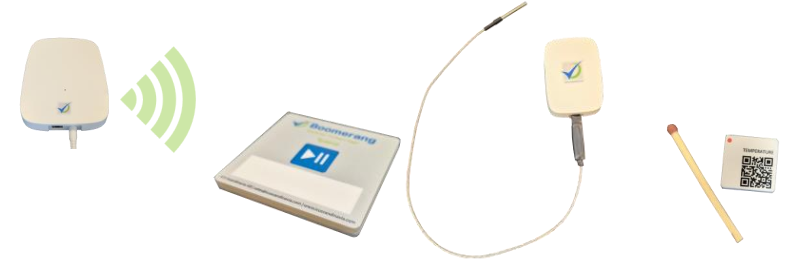
* bramki **BTiny**,
* czujniki misji **BTiny** (rejestratory misji).
Aby przechowywać dane misji:
* tworzysz **obiekty misji**,
* przypisujesz do nich **punkty pomiarowe misji**.
W systemie mogą istnieć:
* **rzeczywiste punkty pomiarowe misji** — przechowują misje zebrane z czujników BTiny,
* **wirtualne punkty pomiarowe misji** — używane m.in. dla Logger Card lub jako „kontenery” dla przeniesionych misji.
### Jak rejestrować misje
#### 1) BTiny Mission
Czujniki BTiny mogą rejestrować temperaturę offline lub online.
Online działa, gdy czujnik jest w zasięgu modułu Cloud Connector.
Odczyty trafiają na serwer Boomerang 3 i są zapisywane w rzeczywistych punktach pomiarowych misji.
{% hint style="info" %}
Rejestratory temperatury BTiny są zasilane bateryjnie i mają bufor pamięci. Dzięki temu rejestrują pomiary także poza zasięgiem Cloud Connector.
{% endhint %}
Opis użycia BTiny: [Wykorzystanie czujnika BTiny Mission](https://help.boomerang3.com/boomerang-3-instrukcja-obslugi-uzytkownika/dashboard/misje/wykorzystanie-czujnika-btiny-mission.md).
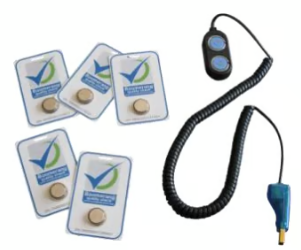
#### 2) Logger Card
Karty Logger Card zapisują temperaturę w trybie offline.
Dane są przesyłane do Boomerang 3 przez aplikację kliencką Logger Card.
Misje są przechowywane w **wirtualnych** punktach pomiarowych misji.
Więcej informacji: [Logger Card](https://help.boomerang3.com/logger-card-client-user-manual/).
### Obsługa misji w systemie
Dalsze kroki i operacje znajdziesz na stronie: [Obsługa misji](https://help.boomerang3.com/boomerang-3-instrukcja-obslugi-uzytkownika/dashboard/misje/obsluga-misji.md).
---
# Agent Instructions
This documentation is published with GitBook. GitBook is the documentation platform designed so that both humans and AI agents can read, navigate, and reason over technical content effectively. Learn more at gitbook.com.
## Querying This Documentation
If you need additional information that is not directly available in this page, you can query the documentation by asking a question.
Perform an HTTP GET request on the following URL with the `ask` and `goal` query parameters:
```
GET https://help.boomerang3.com/boomerang-3-instrukcja-obslugi-uzytkownika/dashboard/misje.md?ask=&goal=
```
`ask` is the immediate question: it should be specific, self-contained, and written in natural language.
`goal` is what the user is ultimately trying to achieve, the reason they need the answer. Sharing it helps GitBook give you a better, more relevant answer. A goal is most helpful when it describes the outcome the user wants rather than restating the question. For example, with `ask=how do I create an API token`, a goal like `automate deployments from our CI pipeline` lets GitBook tailor the answer to that use case.
The response will contain a direct answer to the question and relevant excerpts and sources from the documentation.
Use this mechanism when the answer is not explicitly present in the current page, you need clarification or additional context, or you want to retrieve related documentation sections.