> For the complete documentation index, see [llms.txt](https://help.boomerang3.com/llms.txt). Markdown versions of documentation pages are available by appending `.md` to page URLs; this page is available as [Markdown](https://help.boomerang3.com/boomerang-3-instrukcja-obslugi-uzytkownika/dashboard.md).
# Pulpit
Główny widok systemu
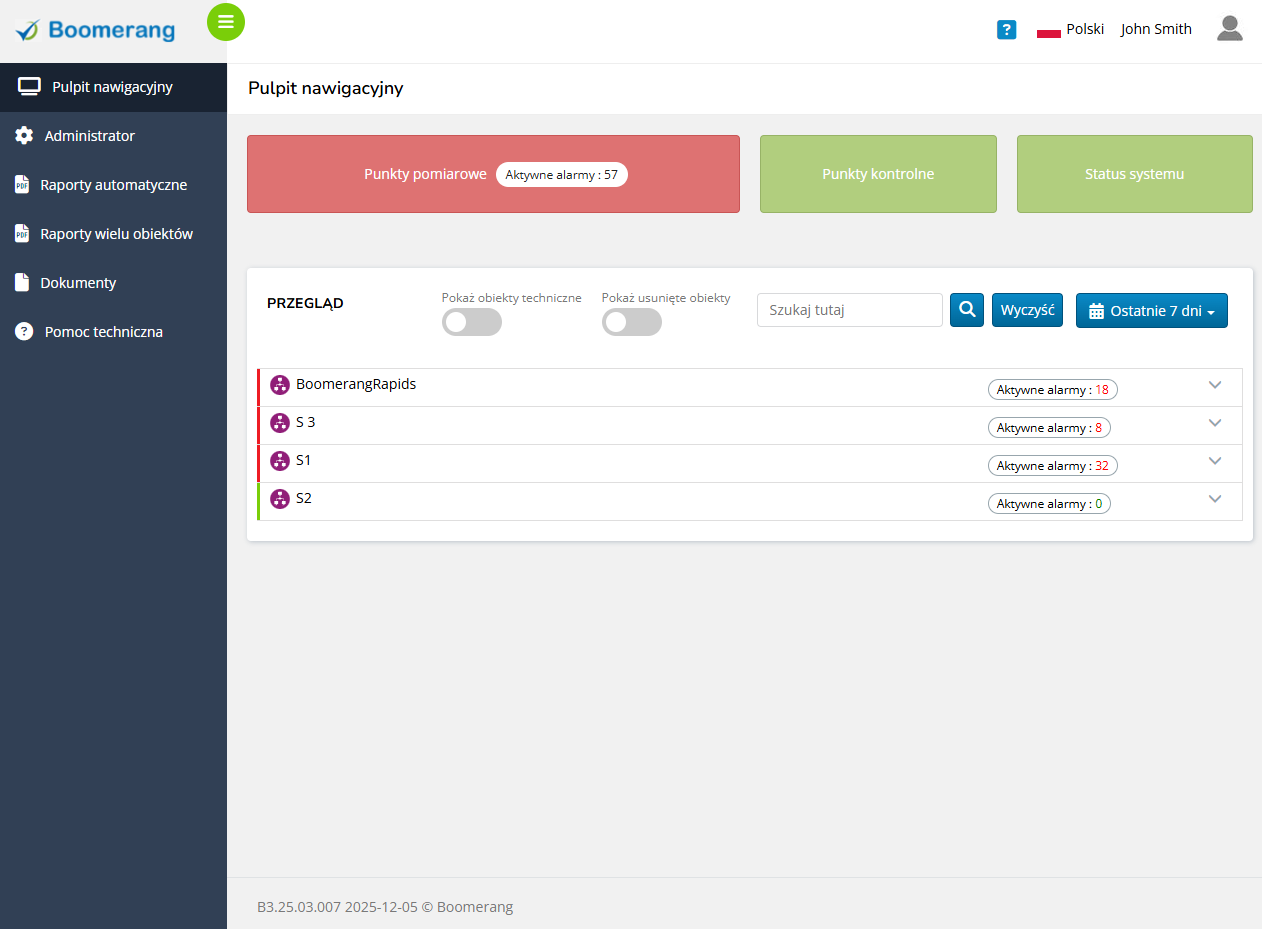
Pulpit to główny widok systemu po zalogowaniu.
Pokazuje strukturę systemu oraz skróty do najczęściej używanych funkcji.
### Powrót do pulpitu
{% stepper %}
{% step %}
### Otwórz pulpit z dowolnego widoku
W [Panelu nawigacji](/boomerang-3-instrukcja-obslugi-uzytkownika/navigation_pane.md) kliknij ikonę pulpitu .
System wróci do pulpitu.
{% endstep %}
{% endstepper %}
{% hint style="info" %}
Jeśli panel nawigacji jest zwinięty, ikony pozostają widoczne. Możesz też rozwinąć panel przyciskiem minimalizuj/maksymalizuj.
{% endhint %}
### Co możesz zrobić na pulpicie
* Przeglądać strukturę organizacji i przechodzić do obiektów.
* Otwierać widoki obiektów i pracować z punktami pomiarowymi.
* Sprawdzać aktywne alarmy i ostrzeżenia.
* Zawężać widok przez wyszukiwanie i zakres czasu.
* Zmieniać język lub inne ustawienia profilu.
### Powiązane tematy
Przejdź dalej w zależności od tego, co chcesz zrobić:
* [Struktura systemu](/boomerang-3-instrukcja-obslugi-uzytkownika/dashboard/system_structure.md)
* [Elementy pulpitu](/boomerang-3-instrukcja-obslugi-uzytkownika/dashboard/dashboard_elements.md)
* [Wybór języka](/boomerang-3-instrukcja-obslugi-uzytkownika/dashboard/language_selection.md)
* [Ustawienia profilu](/boomerang-3-instrukcja-obslugi-uzytkownika/dashboard/profile_settings_and_logout.md)
* [Przyciski pulpitu](/boomerang-3-instrukcja-obslugi-uzytkownika/dashboard/dashboard_buttons.md)
* [Widok obiektu](/boomerang-3-instrukcja-obslugi-uzytkownika/dashboard/object_view.md)
* [Obsługa alarmów i ostrzeżeń](/boomerang-3-instrukcja-obslugi-uzytkownika/dashboard/alarms_and_warnings.md)
---
# Agent Instructions
This documentation is published with GitBook. GitBook is the documentation platform designed so that both humans and AI agents can read, navigate, and reason over technical content effectively. Learn more at gitbook.com.
## Querying This Documentation
If you need additional information that is not directly available in this page, you can query the documentation dynamically by asking a question.
Perform an HTTP GET request on the current page URL with the `ask` query parameter, and the optional `goal` query parameter:
```
GET https://help.boomerang3.com/boomerang-3-instrukcja-obslugi-uzytkownika/dashboard.md?ask=&goal=
```
`ask` is the immediate question: it should be specific, self-contained, and written in natural language.
`goal` is optional and describes the broader end goal you are ultimately trying to accomplish on behalf of the user. GitBook uses it to tailor the answer towards what is most useful for that goal.
The response will contain a direct answer to the question and relevant excerpts and sources from the documentation.
Use this mechanism when the answer is not explicitly present in the current page, you need clarification or additional context, or you want to retrieve related documentation sections.
 .
System wróci do pulpitu.
{% endstep %}
{% endstepper %}
{% hint style="info" %}
Jeśli panel nawigacji jest zwinięty, ikony pozostają widoczne. Możesz też rozwinąć panel przyciskiem minimalizuj/maksymalizuj.
{% endhint %}
### Co możesz zrobić na pulpicie
* Przeglądać strukturę organizacji i przechodzić do obiektów.
* Otwierać widoki obiektów i pracować z punktami pomiarowymi.
* Sprawdzać aktywne alarmy i ostrzeżenia.
* Zawężać widok przez wyszukiwanie i zakres czasu.
* Zmieniać język lub inne ustawienia profilu.
### Powiązane tematy
Przejdź dalej w zależności od tego, co chcesz zrobić:
* [Struktura systemu](/boomerang-3-instrukcja-obslugi-uzytkownika/dashboard/system_structure.md)
* [Elementy pulpitu](/boomerang-3-instrukcja-obslugi-uzytkownika/dashboard/dashboard_elements.md)
* [Wybór języka](/boomerang-3-instrukcja-obslugi-uzytkownika/dashboard/language_selection.md)
* [Ustawienia profilu](/boomerang-3-instrukcja-obslugi-uzytkownika/dashboard/profile_settings_and_logout.md)
* [Przyciski pulpitu](/boomerang-3-instrukcja-obslugi-uzytkownika/dashboard/dashboard_buttons.md)
* [Widok obiektu](/boomerang-3-instrukcja-obslugi-uzytkownika/dashboard/object_view.md)
* [Obsługa alarmów i ostrzeżeń](/boomerang-3-instrukcja-obslugi-uzytkownika/dashboard/alarms_and_warnings.md)
---
# Agent Instructions
This documentation is published with GitBook. GitBook is the documentation platform designed so that both humans and AI agents can read, navigate, and reason over technical content effectively. Learn more at gitbook.com.
## Querying This Documentation
If you need additional information that is not directly available in this page, you can query the documentation dynamically by asking a question.
Perform an HTTP GET request on the current page URL with the `ask` query parameter, and the optional `goal` query parameter:
```
GET https://help.boomerang3.com/boomerang-3-instrukcja-obslugi-uzytkownika/dashboard.md?ask=
.
System wróci do pulpitu.
{% endstep %}
{% endstepper %}
{% hint style="info" %}
Jeśli panel nawigacji jest zwinięty, ikony pozostają widoczne. Możesz też rozwinąć panel przyciskiem minimalizuj/maksymalizuj.
{% endhint %}
### Co możesz zrobić na pulpicie
* Przeglądać strukturę organizacji i przechodzić do obiektów.
* Otwierać widoki obiektów i pracować z punktami pomiarowymi.
* Sprawdzać aktywne alarmy i ostrzeżenia.
* Zawężać widok przez wyszukiwanie i zakres czasu.
* Zmieniać język lub inne ustawienia profilu.
### Powiązane tematy
Przejdź dalej w zależności od tego, co chcesz zrobić:
* [Struktura systemu](/boomerang-3-instrukcja-obslugi-uzytkownika/dashboard/system_structure.md)
* [Elementy pulpitu](/boomerang-3-instrukcja-obslugi-uzytkownika/dashboard/dashboard_elements.md)
* [Wybór języka](/boomerang-3-instrukcja-obslugi-uzytkownika/dashboard/language_selection.md)
* [Ustawienia profilu](/boomerang-3-instrukcja-obslugi-uzytkownika/dashboard/profile_settings_and_logout.md)
* [Przyciski pulpitu](/boomerang-3-instrukcja-obslugi-uzytkownika/dashboard/dashboard_buttons.md)
* [Widok obiektu](/boomerang-3-instrukcja-obslugi-uzytkownika/dashboard/object_view.md)
* [Obsługa alarmów i ostrzeżeń](/boomerang-3-instrukcja-obslugi-uzytkownika/dashboard/alarms_and_warnings.md)
---
# Agent Instructions
This documentation is published with GitBook. GitBook is the documentation platform designed so that both humans and AI agents can read, navigate, and reason over technical content effectively. Learn more at gitbook.com.
## Querying This Documentation
If you need additional information that is not directly available in this page, you can query the documentation dynamically by asking a question.
Perform an HTTP GET request on the current page URL with the `ask` query parameter, and the optional `goal` query parameter:
```
GET https://help.boomerang3.com/boomerang-3-instrukcja-obslugi-uzytkownika/dashboard.md?ask=