> For the complete documentation index, see [llms.txt](https://help.boomerang3.com/llms.txt). Markdown versions of documentation pages are available by appending `.md` to page URLs; this page is available as [Markdown](https://help.boomerang3.com/bbo-gateway-installation-manual/mechanical-installation/enclosure-opening.md). Agents can also search and read this documentation through its [MCP server](https://help.boomerang3.com/~gitbook/mcp).
# Enclosure opening
It is necessary to open the module enclosure during installation and maintenance to connect the cables or check the module. Please note that the pictures below present different type of equipment using the same type of enclosure.
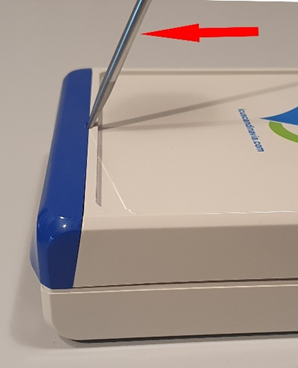
To open enclosures unlock the hinge by using a flat screwdriver pushing it as indicated by the arrows on the pictures below. After releasing the hinge, the lid can be swung open.
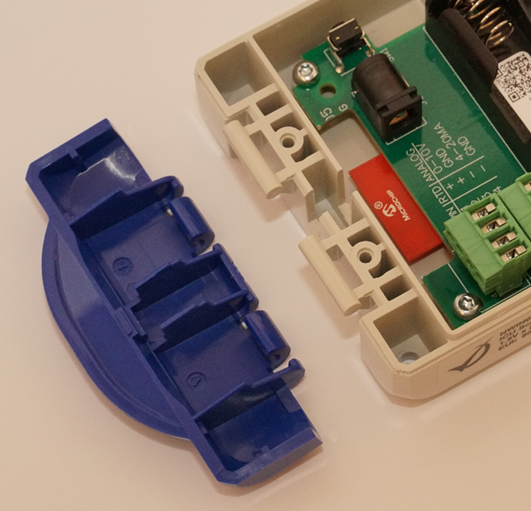
The blue hinge can be temporarily removed for insertion of cables through a milled slot.
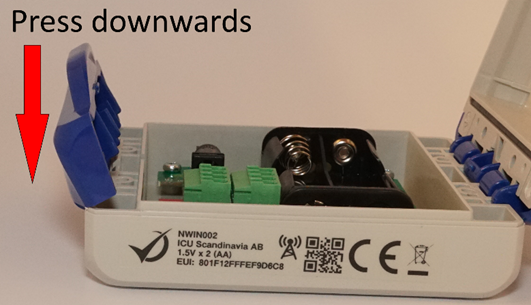
To remove the hinge:
* Open the enclosure.
* Swing the lid open.
* Return the hinge to an upright position.
* Press the hinge towards the bottom of the enclosure (carefully but with force).
The hinge should now snap off the bottom of the enclosure.
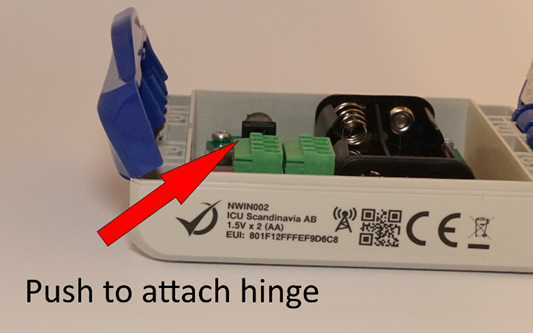
To reattach the hinge:
* Swing the lid open.
* Position the hinge close to the bottom of the enclosure.
* Press inwards and upwards to snap the hinge to the bottom of the enclosure.
The hinge should now be attached to the bottom of the enclosure (make sure it moves freely).
Always mount the enclosure with the cable slot facing down. This reduces the risk of getting dust or water inside the enclosure.
---
# Agent Instructions
This documentation is published with GitBook. GitBook is the documentation platform designed so that both humans and AI agents can read, navigate, and reason over technical content effectively. Learn more at gitbook.com.
## Querying This Documentation
If you need additional information that is not directly available in this page, you can query the documentation by asking a question.
Perform an HTTP GET request on the following URL with the `ask` and `goal` query parameters:
```
GET https://help.boomerang3.com/bbo-gateway-installation-manual/mechanical-installation/enclosure-opening.md?ask=&goal=
```
`ask` is the immediate question: it should be specific, self-contained, and written in natural language.
`goal` is what the user is ultimately trying to achieve, the reason they need the answer. Sharing it helps GitBook give you a better, more relevant answer. A goal is most helpful when it describes the outcome the user wants rather than restating the question. For example, with `ask=how do I create an API token`, a goal like `automate deployments from our CI pipeline` lets GitBook tailor the answer to that use case.
The response will contain a direct answer to the question and relevant excerpts and sources from the documentation.
Use this mechanism when the answer is not explicitly present in the current page, you need clarification or additional context, or you want to retrieve related documentation sections.